Let’s be honest.
Final Cut Pro has always had a certain energy.
Some people treat it like the clean, elegant genius of the editing world. Other people hear the words Mac only and immediately start acting like they’ve been personally excluded from civilization.
Both reactions are a little dramatic.
So here’s the real question:
Is Final Cut Pro actually worth using in 2026, or is it just the shiny Apple option people pick because it looks nice and lives next to Logic Pro?
Short answer: yeah, it’s worth using — especially if you’re on Mac and want a polished, serious video editor that feels faster and cleaner than a lot of heavier software. Apple describes Final Cut Pro as a tool for creating polished, pro-quality videos across Mac and iPad, with built-in features for editing, audio, motion graphics, and color grading.
The quick answer
If you want the blunt version before we get into it:
- Yes, Final Cut Pro is worth it for a lot of Mac-based creators.
- It makes the most sense for YouTubers, editors, solo creators, and Apple-heavy users who want a serious tool without the drag of a subscription.
- It’s probably not the best fit if you are on Windows, rely heavily on broader Adobe workflows, or want something designed around the largest cross-platform team ecosystem.
That’s the clean version.
What Final Cut Pro actually is
Final Cut Pro is Apple’s professional video editing software, but Apple is clearly pushing it as more than just a timeline editor. Its official page highlights video creation, video editing, AI features that build on Apple Intelligence, titles, transitions, and effects, audio editing, and broader workflows across Apple devices. Apple also says it’s part of Apple Creator Studio, alongside tools like Logic Pro and Pixelmator Pro.
In normal-person language:
Final Cut Pro is Apple trying to give creators a powerful editor that still feels clean, smooth, and not like you need a pilot’s license to use it.
And honestly, that’s a big part of its appeal.
What Final Cut Pro does well
This is where Final Cut Pro earns its respect.
1. It feels fast and clean
Apple’s whole pitch around Final Cut Pro is speed, simplicity, and polish. The official site literally frames it around being a complete video playground for editing, audio, motion graphics, and color grading, while also saying you can edit quickly, work smoothly, and create endlessly.
That sounds like marketing, sure.
But it also reflects the real lane Final Cut has always had: a serious editor that tries not to feel like a punishment.
2. The editing tools are strong without feeling bloated
Apple highlights features like:
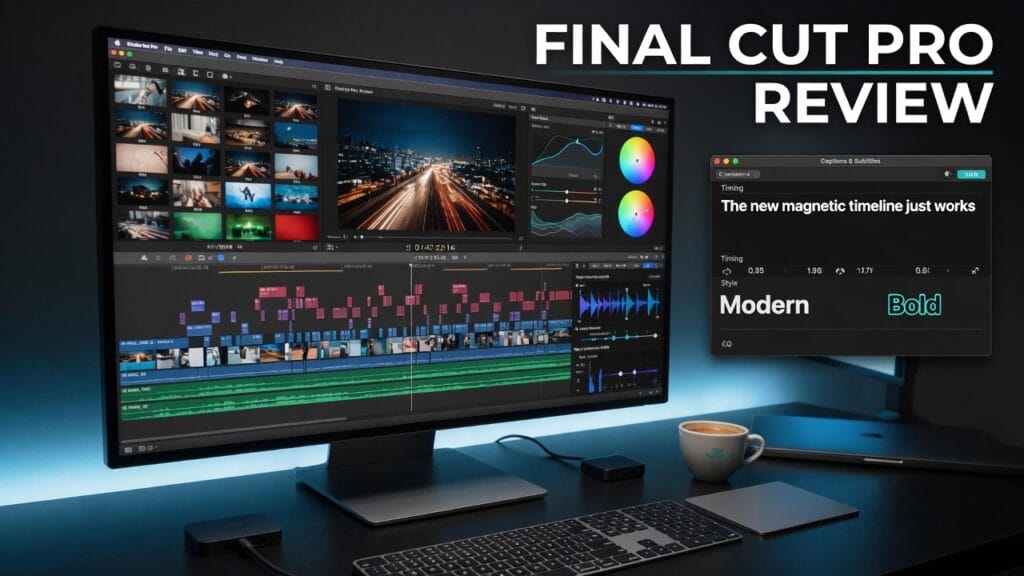
- Magnetic Timeline for fast, flexible editing
- Magnetic Mask for isolating people and objects
- Automatic captions
- Visual Search
- Transcript Search
That’s a pretty solid mix.
Because this is where Final Cut makes sense for a lot of creators: it gives you serious editing tools, but in a package that still feels more approachable than some “welcome to post-production hell” software.
3. It has genuinely useful smart features
Apple is leaning into AI and machine-learning-assisted workflow, but not in an obnoxious “AI fixes your life now” way.
The official page highlights:
- Object Tracker
- Enhance Light and Color
- Smooth Slo-Mo
- automatic reframing for different aspect ratios
- Beat Detection for cutting to music more easily
That stuff is actually useful.
It’s not just there so someone can slap “intelligence” on the landing page and hope investors clap.
4. The Mac workflow is a real advantage
This is one of Final Cut Pro’s biggest strengths.
Apple explicitly positions it across Mac and iPad, and frames it as part of a broader Apple workflow across devices, apps, and accessories. If you already live in Apple’s ecosystem, that matters a lot.
Because some software is powerful but clunky.
Final Cut’s selling point is that it tries to be powerful and smooth.
What kind of user Final Cut Pro is best for
Final Cut Pro makes the most sense for:
- Mac creators
- YouTubers
- solo editors
- people who want a serious editor without a subscription
- creators who like clean workflows more than giant messy workspaces
- people already using Apple gear and apps
Basically:
if you’re already in the Apple world and want a serious editing tool that feels polished, Final Cut Pro has a very real lane.
If you’re outside that world, the value drops fast.
What sucks about Final Cut Pro
Now for the part where we stop pretending it’s perfect.
1. It’s Mac-focused, period
This is the obvious one.
If you’re on Windows, this is not your editor. That alone immediately limits who Final Cut makes sense for.
So yes, it’s good.
But it’s also living inside Apple’s garden whether you like that or not.
2. It’s less universal than some competing editors
This is one of the tradeoffs.
Final Cut can be amazing for Apple users, but it does not have the same broad “everybody and their agency uses this” feel that some other editors have. If your workflows revolve around broader cross-platform team norms, that can matter.
3. Apple’s polish doesn’t automatically mean it’s for everyone
Some creators love Final Cut because it feels cleaner and faster.
Others prefer software that feels more open-ended, more standard in mixed teams, or more deeply tied into other non-Apple pipelines.
So this is one of those tools where fit matters a lot.
The pricing situation
This is one of Final Cut Pro’s nicest advantages.
Apple’s official page says Final Cut Pro for Mac is available as a one-time purchase on the App Store, and also offers a free trial. Apple also notes that Final Cut Pro is part of Apple Creator Studio, but the Mac version itself is still sold as a standalone one-time purchase instead of a monthly subscription.
That matters.
Because in a world where software loves billing you every month until the sun explodes, a one-time purchase still feels refreshingly sane.
So is Final Cut Pro worth it?
Yeah — for the right person, absolutely.
Final Cut Pro is worth it for:
- Mac-based creators
- editors who want serious tools without subscriptions
- YouTubers and solo creators
- people who want strong editing, search, captions, color, audio, and smarter workflow tools in one polished package
It’s probably not worth it for:
- Windows users
- people who need cross-platform standardization above all else
- creators who are already deeply tied into another editing ecosystem and have no reason to switch
My honest verdict
Final Cut Pro is still a very strong editing option.
Not because it’s available only on Apple stuff.
Not because it has a pretty interface.
And definitely not because Apple marketing can make anything sound like it was designed by monks in a glass temple.
It’s strong because it combines real editing power with a cleaner, smoother workflow than a lot of heavier software. Apple’s own page makes that pretty clear: Final Cut is built around editing, audio, motion graphics, color grading, automatic captions, search tools, AI-assisted features, and workflow across Apple devices.
So here’s the clean verdict:
Use Final Cut Pro if:
- you’re on Mac
- you want a serious editor without a subscription
- you like polished workflows
- you want strong editing tools without feeling buried in clutter
Skip Final Cut Pro if:
- you’re on Windows
- you need a more universal cross-platform workflow
- you’re already deeply committed to another editor and there’s no real reason to switch
Final thoughts
Final Cut Pro is not for everybody.
But for the right Mac-based creator, it still makes a lot of sense.
It’s polished, powerful, and not built around slowly draining your wallet every month.
And honestly, that alone gives it a pretty solid argument.