

Our Runway review breaks down pricing, features, strengths, weaknesses, and whether this AI video tool is actually worth paying for in 2026
Runway Review: Quick Verdict
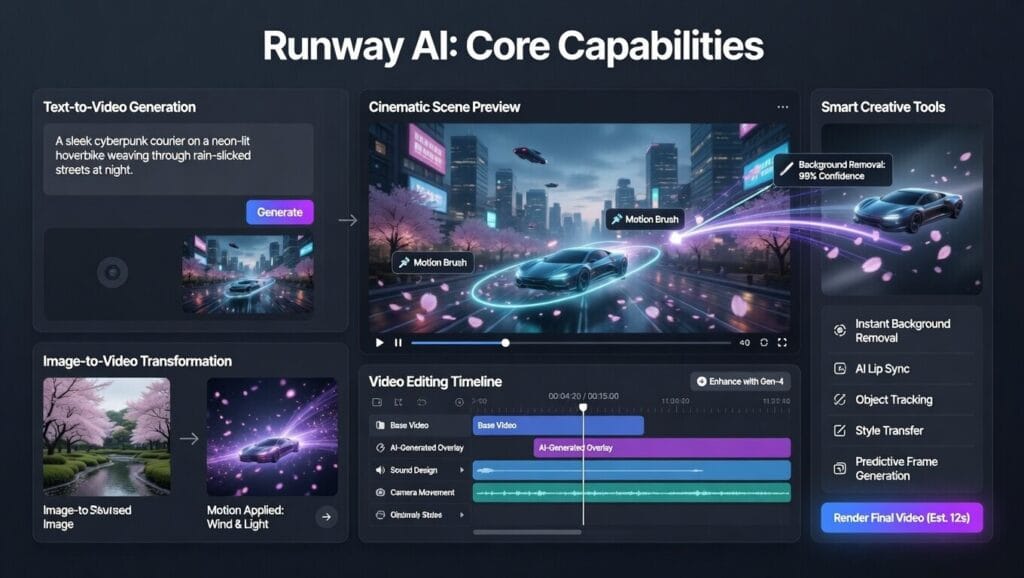
Runway is one of the strongest AI video platforms out right now, and it is clearly built for people who want more than a toy. Its current product lineup includes image and video generation, editing tools, performance capture, multi-shot workflows, and access to a wide mix of models inside one platform. Runway’s current product pages also spotlight Gen-4.5 as its flagship video model and position the platform as a full creative workflow, not just a prompt box with a pretty landing page.
The catch is the same one that sneaks up on a lot of people with AI video tools: credits. Runway’s pricing page offers Free, Standard, Pro, and Unlimited plans, and its help docs spell out that newer models like Gen-4.5 use credits per second of generated video. So yes, it is powerful. Also yes, your credits can vanish faster than your self-control on a late-night “one more generation” session.
Our rating: 8.8/10
What Is Runway?
Runway is an AI creation platform focused heavily on video, but it also covers images, editing, audio, and broader creative workflows. Its main product page describes it as a toolkit with access to image, video, audio, editing, and language models, while the app itself highlights things like films, shorts, scenes, characters, VFX, multi-shot video, scene builder, video editing, upscaling, and performance capture with Act-Two.
In other words, Runway is not trying to be “Canva but make it cinematic.” It is trying to be a serious creative playground for video-heavy work.
Runway Pricing
Runway’s pricing page currently lists these main plans:
- Free
- Standard
- Pro
- Unlimited at $76 per user/month billed annually, with 2,250 monthly credits plus unlimited image and video generations in Explore Mode at a relaxed rate
- Enterprise by custom arrangement
Runway’s help docs also explain that workspace pricing is per editor, and plan tier affects export options and other capabilities. Standard includes 4K video editor composition exports and 2K image exports, while Pro adds ProRes and PNG sequence export options.
So the clean version is:
- Free for trying it
- Standard/Pro for real use
- Unlimited for heavier creators who hate watching credits evaporate every five minutes
That’s my summary, but it lines up with how Runway structures the plans and workspace billing.
Best Runway Features
1. Strong video generation models
Runway is leaning hard into its video models, especially Gen-4.5, which its site describes as delivering higher visual fidelity, motion quality, and creative control. Runway also previously introduced Gen-4 around consistent characters, locations, and objects across scenes, which matters a lot if you want videos that feel coherent instead of like a fever dream stitched together by a malfunctioning robot director.
2. Real creative workflow tools
Runway is more than text-to-video. Its product pages highlight multi-shot video, scene builder, edit video, upscale video, Act-Two performance capture, product-shot reshoots, and remove-from-video editing. That makes it feel much closer to a usable creative suite than a one-button gimmick.
3. Broad model access inside one platform
Runway’s product page currently lists access to a wide menu of models for image, video, and other media generation. That includes Runway’s own models and outside models surfaced in the platform. So if you like having one creative hub instead of juggling a mess of tabs like a digital plate-spinner, this is a real plus.
4. Explore Mode on Unlimited
The Unlimited plan includes Explore Mode, which Runway says allows unlimited generations of image and video models at a relaxed rate without using credits. That is a big deal for heavy users who would rather not do credit math every time they want to experiment.
5. API and developer pricing
Runway also has a developer side. Its API pricing docs show per-credit pricing and specific model costs, such as Gen-4 image generation and other media usage. That makes Runway relevant not just for creators, but also for teams building AI media into products or workflows.
Where Runway Is Best
Runway is strongest for:
- creators making AI-heavy video content
- filmmakers and ad creatives
- marketers building visual campaigns
- people who want better control and consistency than most lightweight video tools
- teams that need stronger creative workflows, not just fast templates
Runway even has dedicated positioning for advertising and marketing teams, where it pitches faster production and more ambitious creative work with lower costs. So this thing is very much aiming beyond casual dabbling.
Where Runway Falls Short
1. Credits matter a lot
Runway’s help center is pretty clear here: tools have credit rates, and Gen-4.5 uses 12 credits per second of generated video. That means a 5-second generation can cost 60 credits, and a 10-second generation can cost 120. So yes, quality is cool. Watching your credits get body-slammed is less cool.
2. Unlimited is not truly “instant everything forever”
Runway’s Unlimited plan offers unlimited generation in Explore Mode, but that mode runs at a relaxed rate. So the tradeoff is pretty obvious: more freedom, less urgency. That is still useful, just not magic.
3. It is probably overkill for casual users
This is an editorial read, but a fair one. If somebody only wants occasional quick social videos, Runway may be more tool than they need. It shines more when you care about creative control, consistency, and more advanced workflows.
4. It can get expensive fast for teams
Since workspace pricing is per editor, scaling usage across multiple people can add up quickly. That is normal for pro tools, but it is still worth saying out loud before somebody invites the whole team and then has a spiritual experience on billing day.
Runway for Creators and Filmmakers
This is where Runway earns its reputation.
If you care about visual storytelling, style consistency, shot experimentation, and AI-assisted creative workflows, Runway is one of the best-known names for a reason. Its product and research pages emphasize cinematic generation, coherent scene building, consistent subjects, and creative control. That is a much stronger pitch than “look, the AI made a weird little clip.”
So for YouTube creators, indie filmmakers, experimental artists, and ad people who want stronger visuals, Runway is a real contender.
Runway for Marketers and Agencies
Runway also makes sense for agencies and marketing teams. Its advertising page positions the platform as a way to move faster from ideation through production while lowering costs and enabling more ambitious campaign ideas.
That makes it appealing for:
- product ads
- campaign visuals
- social video
- concept generation
- internal pitches
- branded video experiments
Basically, if a team needs to make visual ideas happen quickly, Runway has a pretty good case.
Runway Pros and Cons
Pros
- Strong AI video reputation
- Gen-4.5 pushes visual fidelity and control
- Good workflow tools beyond simple generation
- Useful for creators, filmmakers, and marketers
- Unlimited plan includes Explore Mode
- Serious platform, not just a novelty
Cons
- Credits can disappear quickly
- High-end usage gets expensive
- Unlimited mode has relaxed-rate tradeoffs
- May be too much for casual users
- Team costs can add up with per-editor pricing
Is Runway Worth It?
Yeah — for the right person, definitely.
If you are serious about AI video, visual storytelling, or creative experimentation, Runway is one of the better platforms to pay attention to. It has stronger workflow depth than a lot of lighter video tools, and it is clearly built for people who care about output quality and control.
If you are just making the occasional clip and do not want to think about credits, though, Runway may feel a little intense. That is not a knock. It just means this is more “creative power tool” than “casual weekend toy.”
Final Verdict
Runway is one of the most important AI video tools to review in 2026 because it sits in that sweet spot between creative ambition and actual usable tooling. It offers serious generation models, meaningful workflow features, and enough control to attract creators who want more than generic output.
The downside is simple: credits, pricing, and team costs can get real in a hurry. But overall, Runway is a legit player, and if BestTechFlow wants to look like it covers the space seriously, this one belongs on the board.
Final score: 8.8/10
Best For
Runway is best for:
- AI video creators
- filmmakers
- marketers
- agencies
- people who want better visual control
- users doing heavier creative work
Not Ideal For
Runway may not be ideal for:
- casual users making random one-off clips
- people who hate credit systems
- teams that need cheap scaling
- anybody who thinks “just one more generation” has never cost them anything before